The 5 Types Of Touch Screen Monitor Technology

Which TYPE OF touch screen Is Best For You?
You interact with a touch screen monitor constantly throughout your daily life. You will see them in cell phones, ATM’s, kiosks, ticket vending machines, manufacturing plants and more. All of these use touch panels to enable the user to interact with a computer or device without the use of a keyboard or mouse. But did you know there are several uniquely different types of Touch Screens? The five most common types of touch screen are: 5-Wire Resistive, Surface Capacitive touch, Projected Capacitive (P-Cap), SAW (Surface Acoustic Wave), and IR (Infrared).
VIEW ALL TOUCH SCREENS
We are often asked “How does a touch screen monitor work?” A touch screen basically replaces the functionality of a keyboard and mouse. Below is a basic description of 5 types of touch screen monitor technology.
The advantages and disadvantages of type of touch screen will help you decide which type touchscreen is most appropriate for your needs:
Resistive Touch Screen
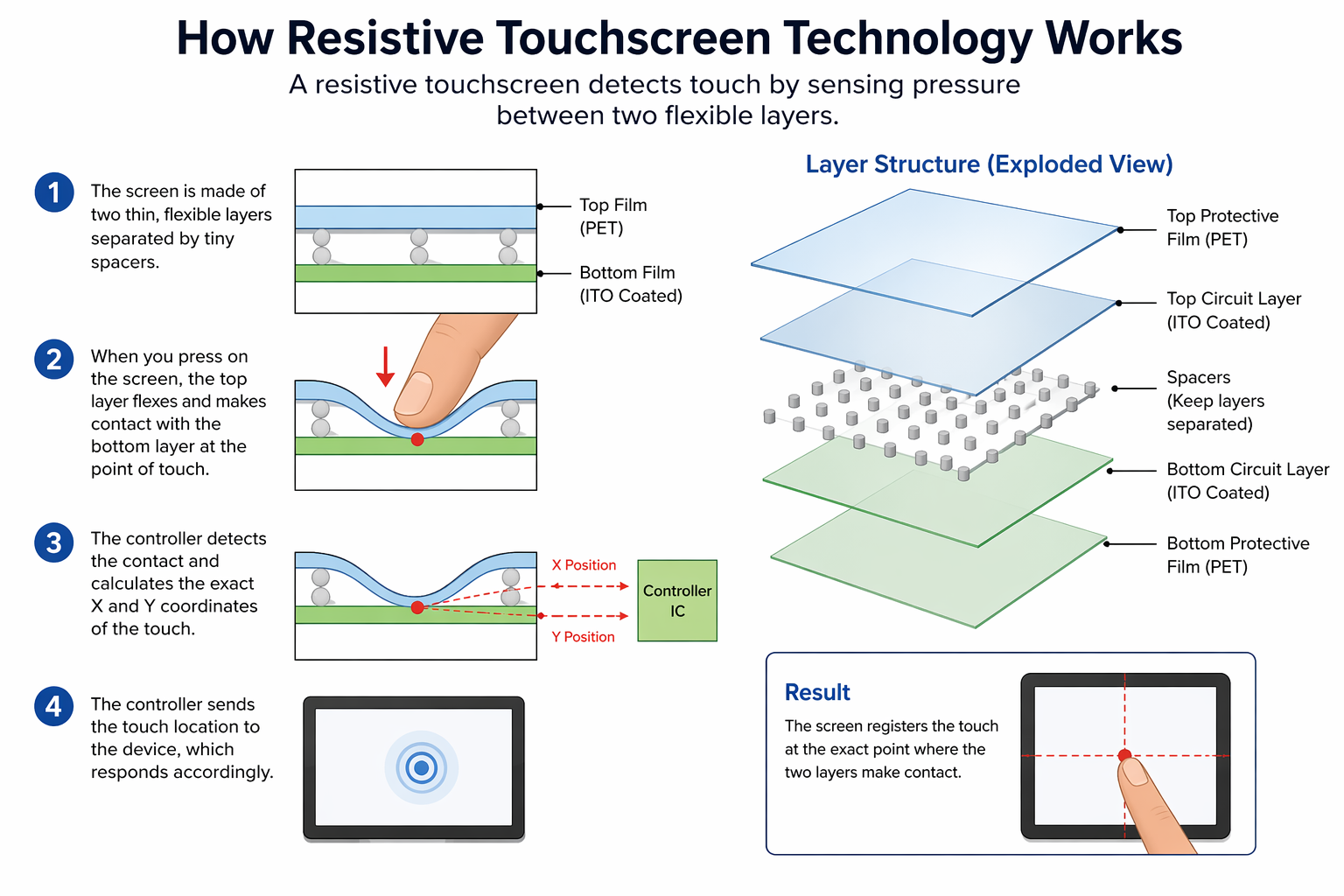
5-Wire Resistive Touch is the most widely touch technology in use today. A resistive touch screen monitor is composed of a glass panel and a film screen, each covered with a thin metallic layer, separated by a narrow gap. For instance, when a user touches the screen, the two metallic layers make contact, resulting in electrical flow. The point of contact is detected by this change in voltage.
Advantages:
- Can activate with virtually any object (finger, stylus, gloved hand, pen, etc.)
- Has tactile feel
- Lowest cost touch technology
- Low power consumption
- Resistant to surface contaminants and liquids (dust, oil, grease, moisture)
Disadvantages:
- Lower image clarity compared to other touch technologies
- Outer polyester film is vulnerable to damage from scratching, poking and sharp object
Surface Capacitive Touch Screen
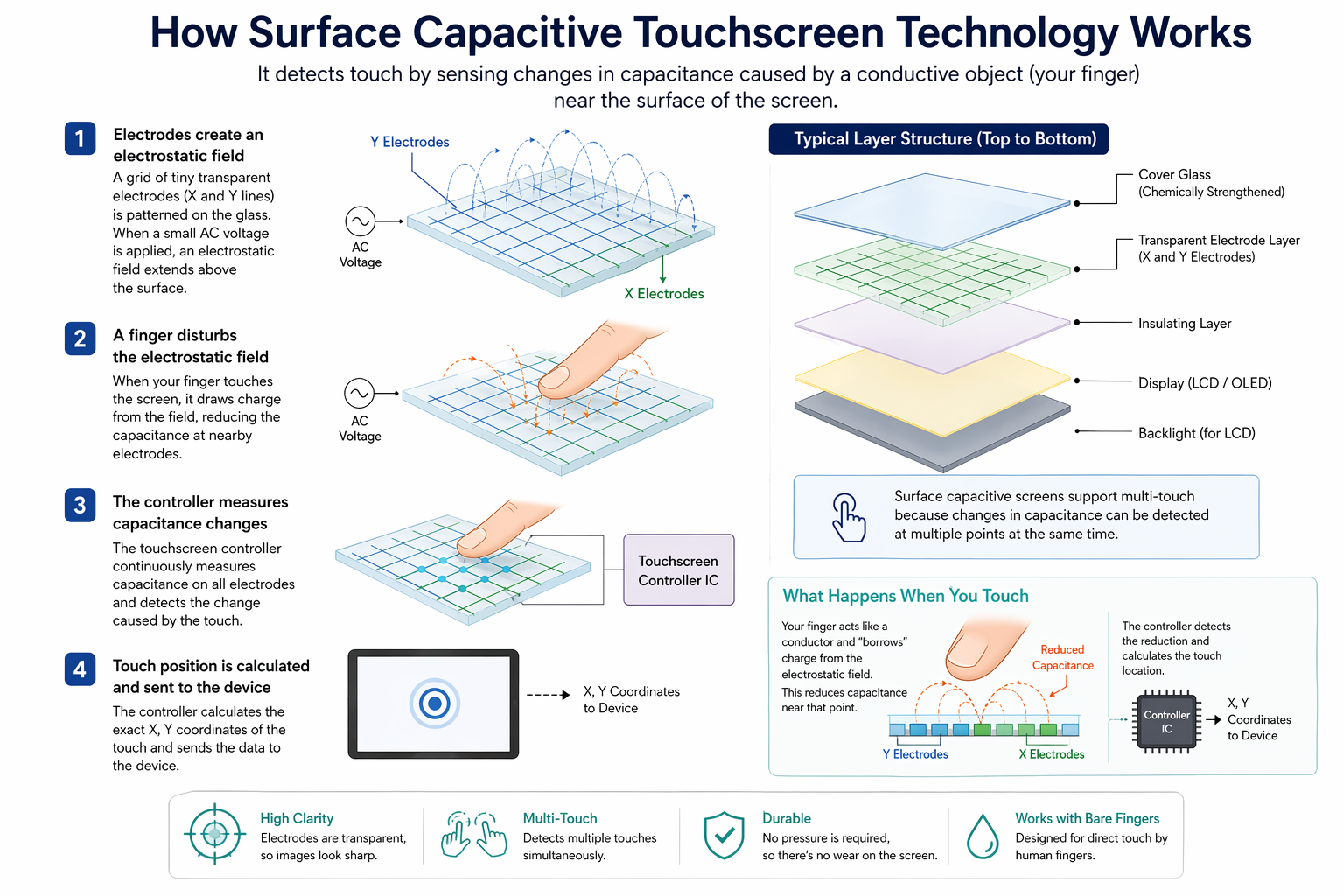
Surface Capacitive touch screen is the second most popular type of touch screens on the market. In a surface capacitive touch screen monitor, a transparent electrode layer is placed on top of a glass panel. This is then covered by a protective cover. When an exposed finger touches the monitor screen, it reacts to the static electrical capacity of the human body. Consequently, some of the electrical charge transfers from the screen to the user. This decrease in capacitance is detected by sensors located at the four corners of the screen, allowing the controller to determine the touch point. Surface capacitive touch screens can only be activated by the touch of human skin or a stylus holding an electrical charge.
Advantages:
- Better image clarity than Resistive Touch
- Durable screen
- Excellent resistance to surface contaminants and liquids (dust, oil, grease, water droplets)
- High scratch resistance
Disadvantages:
- Requires bare finger or capacitive stylus for activation
- Sensitivity to EMI/RFI
Projected Capacitive Touch Screen
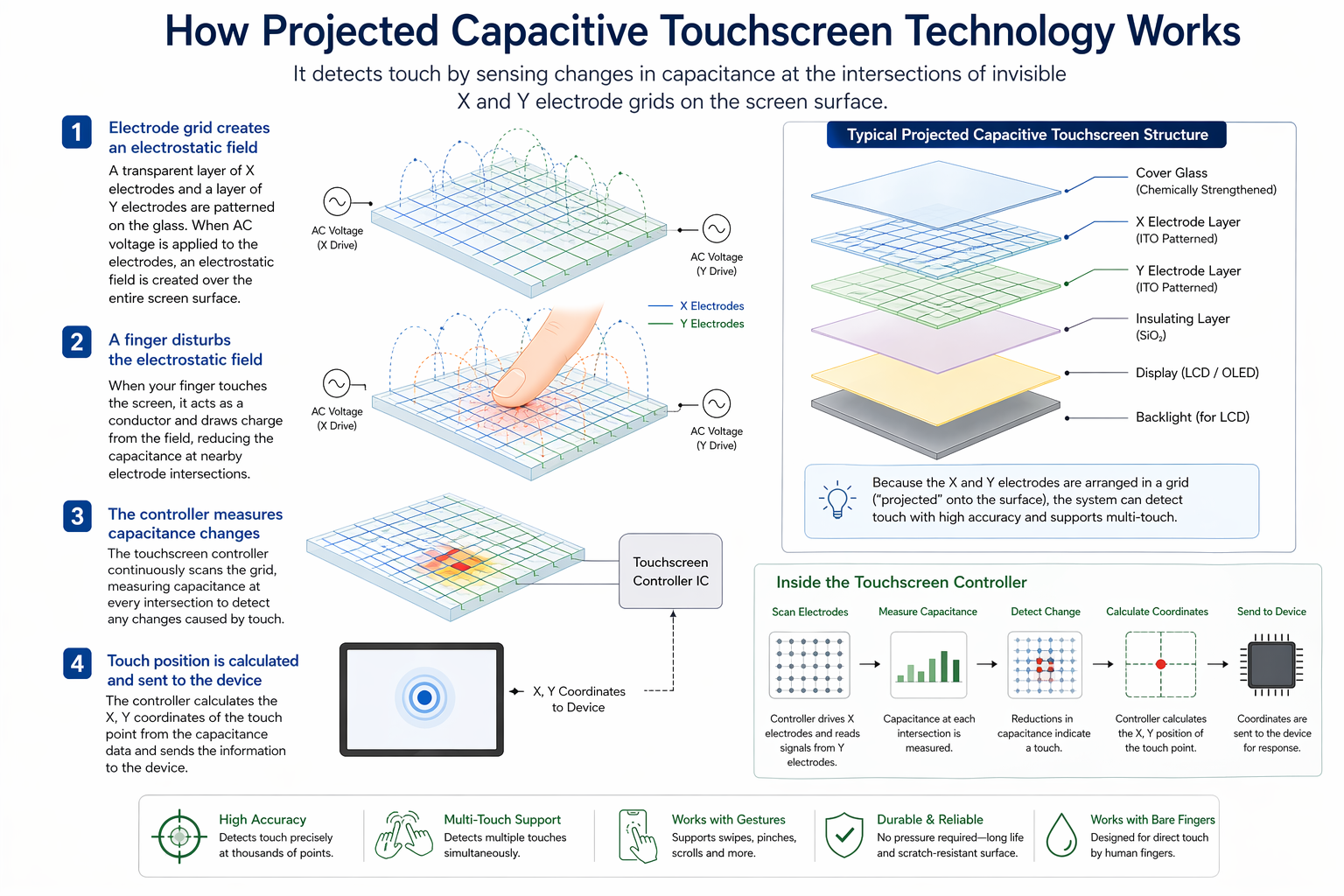
Projected Capacitive (P-Cap) is similar to Surface Capacitive, but it offers two primary advantages. First, in addition to a bare finger, it can also be activated with surgical gloves or thin cotton gloves. Secondly, P-Cap enables multi-touch activation (simultaneous input from two or more fingers). A projected capacitive touch screen is composed of a sheet of glass with embedded transparent electrode films and an IC chip. This creates a three dimensional electrostatic field. Therefore, when a finger comes into contact with the screen, the ratios of the electrical currents change and the computer is able to detect the touch points. All our P-Cap touch screens feature a Zero-Bezel enclosure.
Advantages:
- Excellent image clarity
- More resistant to scratching than resistive
- Resistant to surface contaminants and liquids (dust, oil, grease, moisture)
- Multi-touch (two or more touch points)
Disadvantages:
- Sensitive to EMI/RFI
- Must be activated via exposed finger, or thin surgical or cotton gloves
SAW (Surface Acoustic Wave) Touch
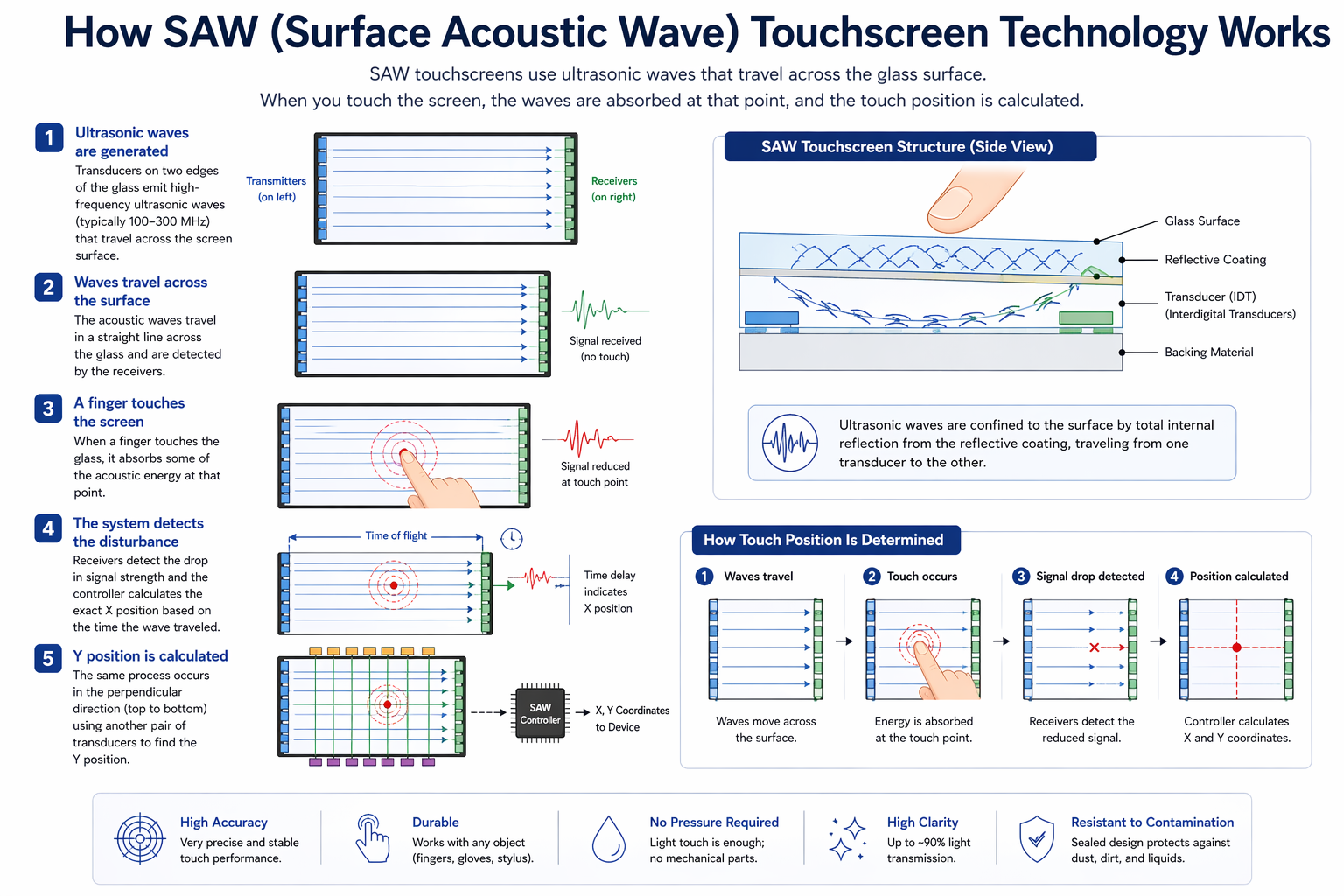
SAW (Surface Acoustic Wave) touch screen monitors utilize a series of piezoelectric transducers and receivers. These are positioned along the sides of the monitor’s glass plate to create an invisible grid of ultrasonic waves on the surface. When the panel is touched, a portion of the wave is absorbed. This allows the receiving transducer to locate the touch point and send this data to the computer. SAW monitors can be activated by a finger, gloved hand, or soft-tip stylus. SAW monitors offer easy use and high visibility.
Advantages:
- Excellent image clarity
- Even better scratch resistance than surface or projected capacitive
- High “touch-life”
Disadvantages:
- Will not activate with hard items (pen, credit card, or fingernail)
- Water droplets remaining on the surface of the screen can cause false triggering
- Solid contaminants on the screen can create non-touch areas until they are removed
IR (Infrared) Touch Screen
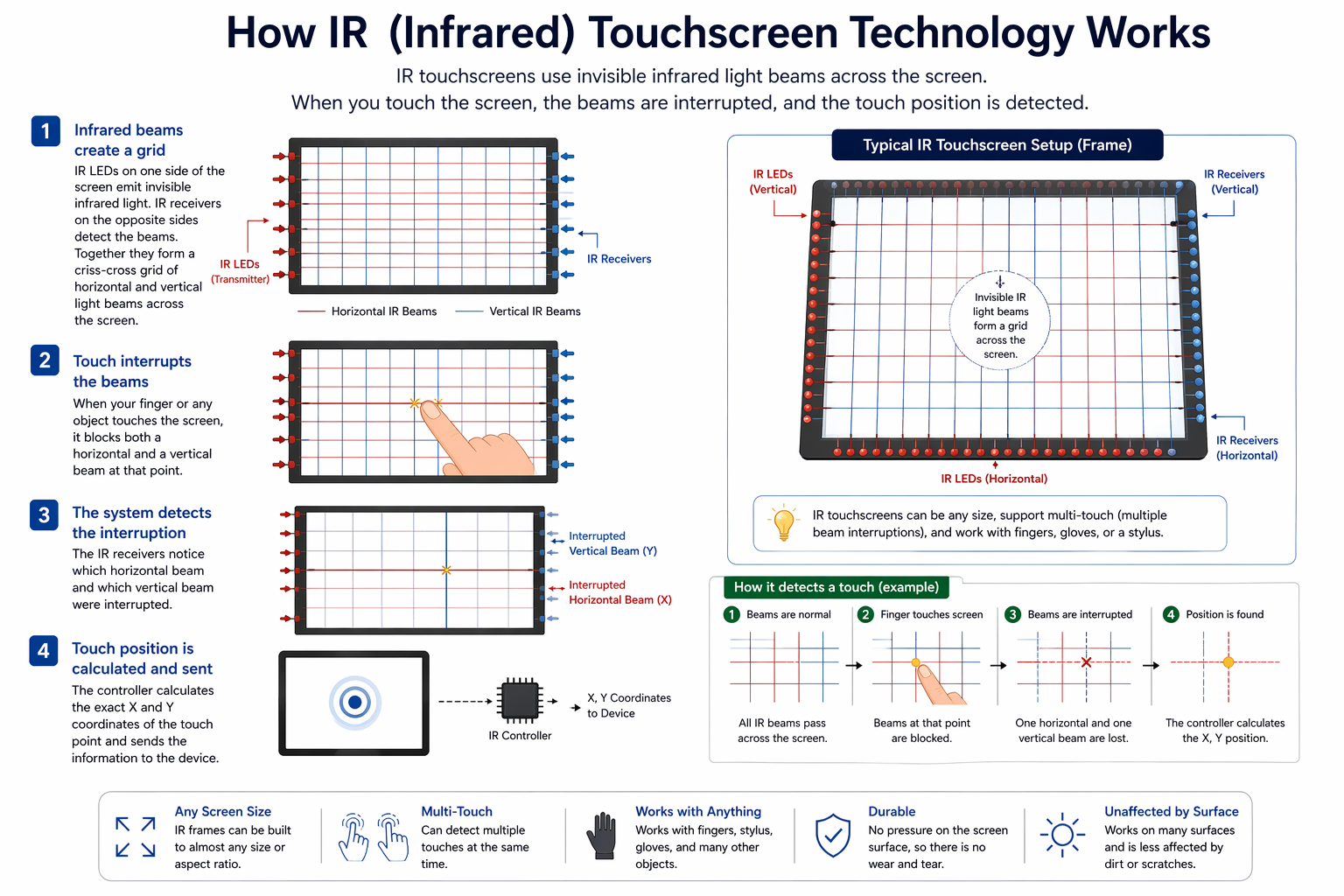
IR (Infrared) type touch screen monitors do not overlay the display with an additional screen or screen sandwich. Instead, infrared monitors use IR emitters and receivers to create an invisible grid of light beams across the screen. This ensures the best possible image quality. When an object interrupts the invisible infrared light beam, the sensors are able to locate the touch point. The X and Y coordinates are then sent to the controller.
Advantages:
- Highest image clarity and light transmission of all touch technologies
- Unlimited “touch-life”
- Impervious to surface scratches
- Multi-touch (two or more touch points)
- Palm Rejection Capability
Disadvantages:
- Accidental activation may occur because the infrared beams are actually above the glass surface
- Dust, oil, or grease buildup on screen or frame could impede light beam causing malfunction
- Buildup of snow and pooling of water (such as rain) can cause false triggering
- May be sensitive to direct high ambient light interference
- Higher cost
VIEW ALL TOUCH SCREENS
We hope you found these touch screen basics useful. TRU-Vu provides industrial touch screen monitors in a wide range of sizes and configurations. This includes UL60601-1 Medical touch screens, Sunlight Readable touch screens, Open Frame touch screens, Waterproof touch screens and many custom touch screen designs. You can learn more by viewing TRU-Vu Touchscreens or call us at 847-259-2344. To address safety and hygiene concerns, see our article on “Touch Screen Cleaning and Disinfecting“.